> ## Documentation Index
> Fetch the complete documentation index at: https://growi.mintlify.site/llms.txt
> Use this file to discover all available pages before exploring further.
# Stripe Integration
> Learn how to set up Stripe with Growi
**Prerequisite** You should have a Stripe account and administrative access to
your Growi dashboard.
# How to Set Up Stripe with Growi
In a few simple steps, you can set up Growi with your Stripe integration to track affiliates. We also have an open-source example [here](https://github.com/Growi-Inc/stripe-integration-example).
## 1. Authenticate Your Stripe Account with Growi
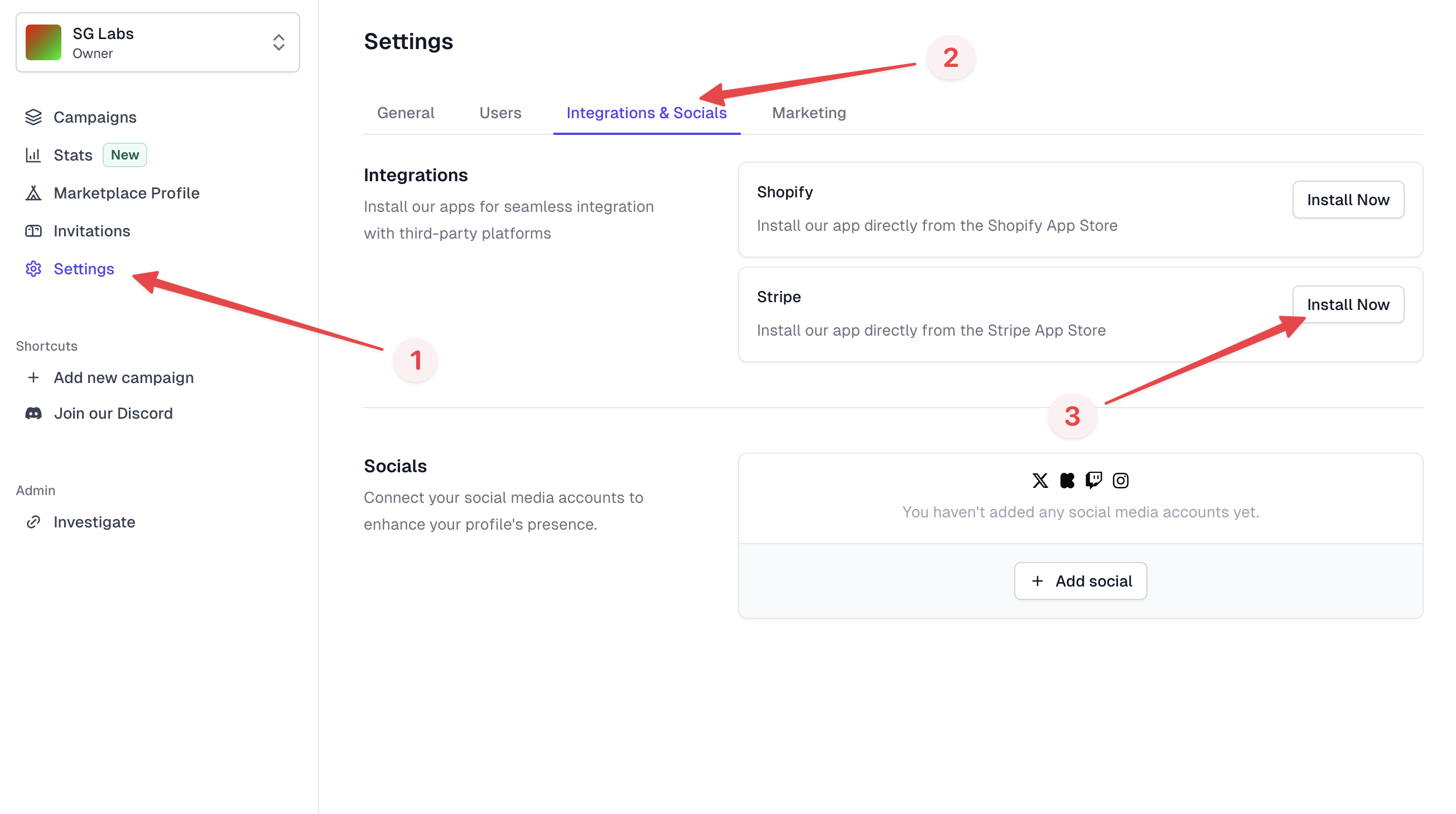
Navigate to the “Settings” tab, then the “Integrations & Socials” section, and finally click “Install Now” on the Stripe integration.
 ## 2. Add Our Tracking Script
Add the following script to your app:
```html theme={null}
```
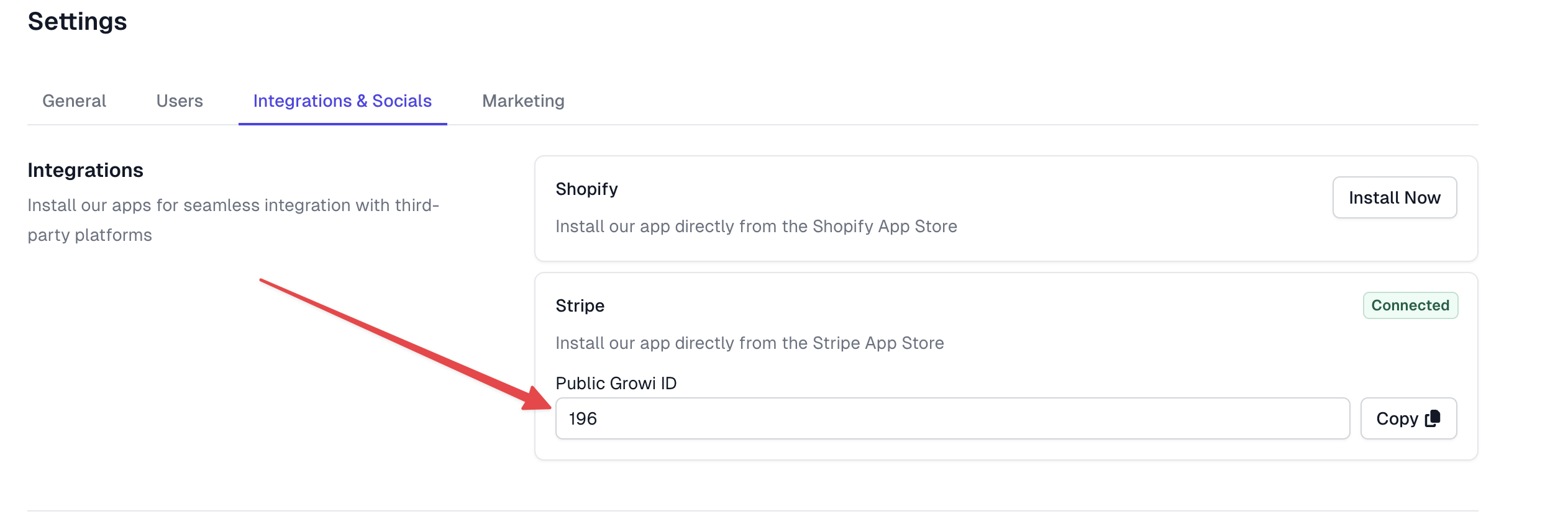
You can get your “Public Growi ID” from the dashboard on the “Integrations &
Socials” page.
## 2. Add Our Tracking Script
Add the following script to your app:
```html theme={null}
```
You can get your “Public Growi ID” from the dashboard on the “Integrations &
Socials” page.
 ## 3. Send Affiliate Code to Stripe
The tracking script will capture users navigating to your site with affiliate parameters and save them to
window\.growi.affiliate\_code. You must pass the affiliate code to the Stripe
metadata using the growi\_affiliate\_code key.
Example: Payment Link
```js theme={null}
const paymentLink = await stripe.paymentLinks.create({
line_items: [
{
price: "price_nj8h23ud",
quantity: 1,
},
],
metadata: {
growi_affiliate_code: window.growi.affiliate_code,
},
});
```
Example: Checkout Session
```js theme={null}
const paymentLink = await stripe.checkout.sessions.create({
line_items: [
{
price: "price_nj8h23ud",
quantity: 1,
},
],
metadata: {
growi_affiliate_code: window.growi.affiliate_code,
},
mode: "subscription",
});
```
Example: Invoice
```js theme={null}
const invoice = await stripe.invoices.create({
metadata: {
growi_affiliate_code: window.growi.affiliate_code,
}
});
```
React Example For those using React, we have
a repository demonstrating our Stripe integration: [React Stripe Integration
Example](https://github.com/Growi-Inc/stripe-integration-example).
## Troubleshooting
Here's how to solve some common problems when setting
up Stripe with Growi.
Ensure you have administrative access and have navigated to the correct
section in the Growi dashboard.
Verify that the script is correctly added to your app and that the Public
Growi ID is correct.
Double-check your implementation of passing the affiliate code to Stripe
metadata. Ensure `window.growi.affiliate_code` is being captured and used
correctly.
## 3. Send Affiliate Code to Stripe
The tracking script will capture users navigating to your site with affiliate parameters and save them to
window\.growi.affiliate\_code. You must pass the affiliate code to the Stripe
metadata using the growi\_affiliate\_code key.
Example: Payment Link
```js theme={null}
const paymentLink = await stripe.paymentLinks.create({
line_items: [
{
price: "price_nj8h23ud",
quantity: 1,
},
],
metadata: {
growi_affiliate_code: window.growi.affiliate_code,
},
});
```
Example: Checkout Session
```js theme={null}
const paymentLink = await stripe.checkout.sessions.create({
line_items: [
{
price: "price_nj8h23ud",
quantity: 1,
},
],
metadata: {
growi_affiliate_code: window.growi.affiliate_code,
},
mode: "subscription",
});
```
Example: Invoice
```js theme={null}
const invoice = await stripe.invoices.create({
metadata: {
growi_affiliate_code: window.growi.affiliate_code,
}
});
```
React Example For those using React, we have
a repository demonstrating our Stripe integration: [React Stripe Integration
Example](https://github.com/Growi-Inc/stripe-integration-example).
## Troubleshooting
Here's how to solve some common problems when setting
up Stripe with Growi.
Ensure you have administrative access and have navigated to the correct
section in the Growi dashboard.
Verify that the script is correctly added to your app and that the Public
Growi ID is correct.
Double-check your implementation of passing the affiliate code to Stripe
metadata. Ensure `window.growi.affiliate_code` is being captured and used
correctly.